
You are using an out of date browser. It may not display this or other websites correctly.
You should upgrade or use an alternative browser.
You should upgrade or use an alternative browser.
Support Can anyone help me with this effect?
- Thread starter fiuxy
- Start date
- Compatible XF Versions
- 2.3

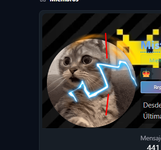
Use the Filter > Render > Difference Clouds technique (common in Photoshop/GIMP/Photopea) on a black layer, followed by Invert and adjusting Levels to create jagged lightning veins. You would then use a Hue/Saturation adjustment to color it blue.Can anyone help me with this effect? I'm looking for it and I don't know how to do it or where to get it.
Here's a reference.
https://foroflix.com/usuarios/mister_x.1/
¡View attachment 17566geometry dash
lunahart63
Registered
You can also achieve a similar effect by generating a noise texture and then applying a Threshold or Levels adjustment to sharpen the lines. After that, use Gaussian Blur slightly and re-adjust Levels to control the thickness. Blending modes like Screen or Linear Dodge (Add) work well on dark backgrounds, especially for lightning-style effects. orbit beats