rabberabbe
Registered
- Thread starter
- #1
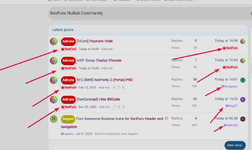
“How do I make this design? xenforo


.username--style2 {
    color: #9999FF;
    font-weight: bold;
}

.username--style2:before {
    font-family: "Font Awesome 5 Pro";
    content: "\f4ba";
    padding-right: 1px;
    display: inline-block;
} xnforo.ir
What does \f4ba in the content property for username--style2 represent?in extra.less fnaf
change the class name to your own
CSS:.username--style2 { color: #9999FF; font-weight: bold; } .username--style2:before { font-family: "Font Awesome 5 Pro"; content: "\f4ba"; padding-right: 1px; display: inline-block; }
