
You are using an out of date browser. It may not display this or other websites correctly.
You should upgrade or use an alternative browser.
You should upgrade or use an alternative browser.
Support Installation issue
- Thread starter SleepOver
- Start date

alexiaamber
Registered
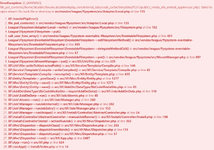
That error looks more like a filesystem/cache problem than a XenForo database issue.I am getting this error every time I try to install Xenforo to my webhost. Any help would be greatly appreciated!
View attachment 18527free online games
The important part is:
No such file or directory
internal_data/code_cache/templates/...
I’d check that internal_data exists and is writable by the PHP/web-server user. In particular, make sure XenForo can create files under internal_data/code_cache/templates/.
A few things I’d try:
- Re-upload the XenForo files to make sure none are missing.
- Verify the internal_data directory and its subdirectories have the correct ownership/permissions.
- Make sure PHP has permission to write to internal_data.
- If this is a fresh install, temporarily remove/disable any add-on files you uploaded and try the installation again. The stack trace shows it is processing BbCodeMediaSite.php, so an add-on/media-site definition may be involved.
- Check the PHP error log as well; it may show why the directory cannot be created.
If you can post your XenForo version and PHP version, plus whether this is a clean installation or an installation with add-ons already uploaded, it should be easier to narrow it down.