
You are using an out of date browser. It may not display this or other websites correctly.
You should upgrade or use an alternative browser.
You should upgrade or use an alternative browser.
Support Problem during upgrade
- Thread starter fjvcni
- Start date
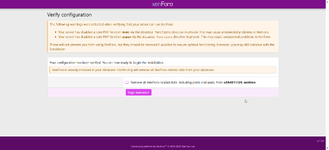
Alright, let’s be precise and boring-in-a-good-way. This isn’t broken; XenForo is asking you to choose a timeline.how can i fix it
- Instead, you should use the upgrade process or simply fix your config.php file to connect to the existing installation
Case A: you want your old forum back (no data loss)
Do not run the installer.
1 - Delete or rename this folder:
/install
2 - Open:
src/config.php
and make sure the database credentials are correct:
database name
username
password
host
3 - Upload all XenForo files again (same or newer version) without touching the database.
4 - Go to:
If the database version is older, XenForo will automatically start the upgrade instead of a fresh install.
Result: forum restored, no wipe, no drama.
--------------------------------------------------------------------------------------------
Case B: you want a clean fresh install (everything reset)
1 - Make a backup of the database first (always).
2 - In the installer screen:
Check “Remove all XenForo-related data”
Click Begin installation
3 - Let XenForo recreate the tables from scratch.
Result: brand-new forum, empty database.
About the exec / popen warnings
These are not blocking errors.
Shared hosting → ignore them.
VPS / dedicated server → remove exec,popen from disable_functions in php.ini if you want full functionality.
XenForo will still run fine without them; some add-ons may complain later.
Golden rule (read twice)
If you are not 100% sure you want to delete the forum, do not check that box.
This isn’t a bug. It’s XenForo politely asking:
“Do you want amnesia, or memory?”
Choose wisely.
- Thread starter
- #8
thank youAlright, let’s be precise and boring-in-a-good-way. This isn’t broken; XenForo is asking you to choose a timeline.
Case A: you want your old forum back (no data loss)
Do not run the installer.
1 - Delete or rename this folder:
/install
2 - Open:
src/config.php
and make sure the database credentials are correct:
database name
username
password
host
3 - Upload all XenForo files again (same or newer version) without touching the database.
4 - Go to:
If the database version is older, XenForo will automatically start the upgrade instead of a fresh install.
Result: forum restored, no wipe, no drama.
--------------------------------------------------------------------------------------------
Case B: you want a clean fresh install (everything reset)
1 - Make a backup of the database first (always).
2 - In the installer screen:
Check “Remove all XenForo-related data”
Click Begin installation
3 - Let XenForo recreate the tables from scratch.
Result: brand-new forum, empty database.
About the exec / popen warnings
These are not blocking errors.
Shared hosting → ignore them.
VPS / dedicated server → remove exec,popen from disable_functions in php.ini if you want full functionality.
XenForo will still run fine without them; some add-ons may complain later.
Golden rule (read twice)
If you are not 100% sure you want to delete the forum, do not check that box.
This isn’t a bug. It’s XenForo politely asking:
“Do you want amnesia, or memory?”
Choose wisely.

Good, this sentence tells us exactly where the wall is.i try all things but still
i cannot proceed unless all XenForo database tables are removed.
What XenForo is saying now is very literal:
I will not continue as an installer unless the database is completely empty of XenForo tables.
So the problem is not files, not config.php, not cache. It is 100% the database.
Let’s fix it cleanly, step by step, no guessing.
---------------------------------------------------------------------------------------------------------
Why this keeps happening
Even if you:
re-upload files
delete /install
fix config.php
 as long as the database still contains XenForo tables, the installer will refuse to proceed unless it’s allowed to delete them.
XenForo detects tables like:
xf_user
xf_post
xf_thread
xf_option
xf_addon
If any of these exist → installer blocks.
----------------------------------------------------------------------------------------------------------
Solution 1 (BEST & SAFEST): create a NEW empty database
This avoids mistakes and accidental data loss.
1 - Go to your hosting control panel (cPanel / DirectAdmin / etc.)
2 - Create:
a new database
a new database user
3 - Assign the user to the database with ALL privileges
4 - Edit: src/config.php
and change only:
dbname
username
password
5 - Run the installer again.
Result: installer proceeds instantly
Zero conflicts
Recommended by sane admins
---------------------------------------------------------------------------------------------------------------
Solution 2: manually delete XenForo tables (advanced, destructive)
This permanently deletes forum data.
1 - Open phpMyAdmin
2 - Select your database (u584811126_xenforo)
3 - Check all tables that start with:
xf_
4 - Choose Drop
5 - Confirm deletion
6 - Refresh the database — it must be completely empty
7 - Run the installer again
If even one xf_ table remains, XenForo will still block.
-----------------------------------------------------------------------------------------------------------------
Very important gotcha (many people miss this)
If your config.php points to:
the wrong database
or a database with table prefix enabled
XenForo may still see old tables.
Make sure this matches reality:
$config['db']['dbname'] = 'EXACT_DATABASE_NAME';
$config['db']['prefix'] = '';
No prefix unless you intentionally used one.
---------------------------------------------------------------------------------------------------------------
About the checkbox
“Remove all XenForo-related data”
If it’s forcing you to check it, that means:
XenForo still detects tables
You are not using a clean database
The checkbox is not the fix.
The database state is the fix.
---------------------------------------------------------------------------------
Final truth (no sugar-coating)
You cannot “convince” XenForo to continue.
You must give it either:
an empty database
or
permission to delete everything inside it.
Once the database is clean, XenForo becomes very cooperative.
This is not a bug — it’s a guardrail.
If you want, you can paste:
your config.php (with passwords hidden)
or say what hosting panel you use
and I’ll pinpoint the exact misalignment.