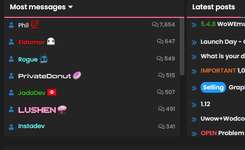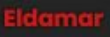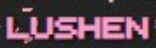
Support Does anyone here know how to use this text style for names?

ZariotaLemu

Registered
Hello everyone, I was just looking through some themes for Xenforo Styles and noticed that this style
“[Synapse-Themes] OGU/FLIPD Replica for XenForo (Experimental) 1.4.6”
has special name "LUSHEN" styles that I personally haven't seen anywhere else.

Now I wanted to ask if there is anyone here who knows how to use such name styles.anyoneiwantthis.png

anyoneiwantthis2.png

anyoneiwantthis3.png

anyoneiwantthis4.png
 

octaviajone

Registered
Hello everyone, I was just looking through some themes for Xenforo Styles and noticed that this style
“[Synapse-Themes] OGU/FLIPD Replica for XenForo (Experimental) 1.4.6”
has special name "LUSHEN" styles that I personally haven't seen anywhere else.

Now I wanted to ask if there is anyone here who knows how to use such name styles.View attachment 18116
Most players agree that the official levels in Geometry Dash are just a tutorial for the insane community maps.
View attachment 18117

View attachment 18118

View attachment 18119
  • Log in to your XenForo Admin Control Panel (ACP).
  • Go to Groups & Permissions > User Groups.
  • Select the group you want to style (e.g., Administrator or Staff).
  • Find the field labeled User banner text CSS or Username CSS.
In the Username CSS box, you would paste something similar to this:
Code:
color: #ffb7ff;
font-weight: bold;
text-shadow: 0 0 5px #ff66cc, 0 0 10px #ff66cc;
background: linear-gradient(to bottom, #ffb7ff 0%, #ffffff 100%);
-webkit-background-clip: text;
-webkit-text-fill-color: transparent;
animation: pulse 2s infinite;
 

ZariotaLemu

Registered
  • Log in to your XenForo Admin Control Panel (ACP).
  • Go to Groups & Permissions > User Groups.
  • Select the group you want to style (e.g., Administrator or Staff).
  • Find the field labeled User banner text CSS or Username CSS.
In the Username CSS box, you would paste something similar to this:
Code:
color: #ffb7ff;
font-weight: bold;
text-shadow: 0 0 5px #ff66cc, 0 0 10px #ff66cc;
background: linear-gradient(to bottom, #ffb7ff 0%, #ffffff 100%);
-webkit-background-clip: text;
-webkit-text-fill-color: transparent;
animation: pulse 2s infinite;
Thank you for your reply, but I am referring to the font that was used. i want to know how to change
the Font Family for User groups A, B, C

Usergroup A: a.PNG

Usergroup B: b.PNG

Usergroup C: c.PNG
 

ZariotaLemu

Registered
In this particular case, it is specifically about these name styles; the font and thus the font family for user groups
Effects can be added later.

The question is how to implement this.
el.PNG ke.PNG
Lu.PNG pr.PNG
 

lyraelling1

Registered
If you’re referring to the actual font (not just the effects), you need to load the font first—either via Google Fonts or by hosting it yourself
Then go to User Group → Usern and
font-
If it’s a custom font, make sure it’s properly added using @font-face in your style (e.g., extra.less), otherwise it won’t apply. slope game
 
Back
Top Bottom