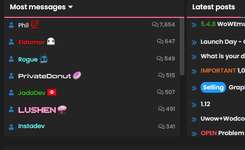
Support Does anyone here know how to use this text style for names?

ZariotaLemu

Registered
Hello everyone, I was just looking through some themes for Xenforo Styles and noticed that this style
“[Synapse-Themes] OGU/FLIPD Replica for XenForo (Experimental) 1.4.6”
has special name "LUSHEN" styles that I personally haven't seen anywhere else.

Now I wanted to ask if there is anyone here who knows how to use such name styles.anyoneiwantthis.png

anyoneiwantthis2.png

anyoneiwantthis3.png

anyoneiwantthis4.png
 

octaviajone

Registered
Hello everyone, I was just looking through some themes for Xenforo Styles and noticed that this style
“[Synapse-Themes] OGU/FLIPD Replica for XenForo (Experimental) 1.4.6”
has special name "LUSHEN" styles that I personally haven't seen anywhere else.

Now I wanted to ask if there is anyone here who knows how to use such name styles.View attachment 18116
Most players agree that the official levels in Geometry Dash are just a tutorial for the insane community maps.
View attachment 18117

View attachment 18118

View attachment 18119
  • Log in to your XenForo Admin Control Panel (ACP).
  • Go to Groups & Permissions > User Groups.
  • Select the group you want to style (e.g., Administrator or Staff).
  • Find the field labeled User banner text CSS or Username CSS.
In the Username CSS box, you would paste something similar to this:
Code:
color: #ffb7ff;
font-weight: bold;
text-shadow: 0 0 5px #ff66cc, 0 0 10px #ff66cc;
background: linear-gradient(to bottom, #ffb7ff 0%, #ffffff 100%);
-webkit-background-clip: text;
-webkit-text-fill-color: transparent;
animation: pulse 2s infinite;
 

ZariotaLemu

Registered
  • Log in to your XenForo Admin Control Panel (ACP).
  • Go to Groups & Permissions > User Groups.
  • Select the group you want to style (e.g., Administrator or Staff).
  • Find the field labeled User banner text CSS or Username CSS.
In the Username CSS box, you would paste something similar to this:
Code:
color: #ffb7ff;
font-weight: bold;
text-shadow: 0 0 5px #ff66cc, 0 0 10px #ff66cc;
background: linear-gradient(to bottom, #ffb7ff 0%, #ffffff 100%);
-webkit-background-clip: text;
-webkit-text-fill-color: transparent;
animation: pulse 2s infinite;
Thank you for your reply, but I am referring to the font that was used. i want to know how to change
the Font Family for User groups A, B, C

Usergroup A: a.PNG

Usergroup B: b.PNG

Usergroup C: c.PNG
 

ZariotaLemu

Registered
In this particular case, it is specifically about these name styles; the font and thus the font family for user groups
Effects can be added later.

The question is how to implement this.
el.PNG ke.PNG
Lu.PNG pr.PNG
 
Back
Top Bottom