
Traffic Counter & Forum Statistics (Real-Time, GeoIP, AMS)

Add-ons Traffic Counter & Forum Statistics (Real-Time, GeoIP, AMS) 1.6.1

Register & Get access to index

XenForo

Administrative
  • Thread starter
  • Admin
  • #6
XenForo updated Traffic Counter & Forum Statistics (Real-Time, GeoIP, AMS) with a new update entry:

Traffic Counter & Forum Statistics (Real-Time, GeoIP, AMS) 1.3.3

What's new in version 1.3.3?

This update focuses on data accuracy and improved visualization for traffic analysis.
  • Critical Chart Time-zone Fix: Resolved an issue where the daily chart was showing a one-day offset due to server time-zone differences. The data displayed in the "Last 30 Days" chart is now perfectly aligned with your database records.
  • Improved Bot Tracking & Visualization: The Daily Chart now features a dual-line display: one solid line...

Read the rest of this update entry...
 

argument

Registered
Of course.
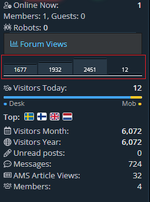
A small change in the statistiche_widget_sidebar template, replace lines 91 to 101:
HTML:
<xf:if is="$hasLicense AND $sparklineMax > 0">
                <div class="stat-sparkline" title="Trend ultimi 7 giorni">
                    <xf:foreach loop="$sparklineData" value="$val" i="$i">
                        <div class="stat-spark-bar {{ $loop.last ? 'today' : '' }}"
                             style="height: {{ ($val / $sparklineMax) * 100 }}%;"
                             data-xf-init="tooltip"
                             title="{{ $val }} visite">
                        </div>
                    </xf:foreach>
                </div>
            </xf:if>
with these lines:
HTML:
<xf:if is="$hasLicense AND $sparklineMax > 0">
    <div class="stat-sparkline" title="Trends last 7 days">
        <xf:foreach loop="$sparklineData" value="$val">
            <div class="stat-spark-bar {{ $loop.last ? 'today' : '' }}"
                 style="height: {{ ($val / $sparklineMax) * 100 }}%;">
                
                <span class="stat-spark-value">
                    {{ $val }}
                </span>

            </div>
        </xf:foreach>
    </div>
</xf:if>

Add these lines to the extra.less template:
CSS:
.stat-spark-bar {
    position: relative;
    display: flex;
    align-items: flex-end;
    justify-content: center;
}

.stat-spark-value {
    width: 100%;
    text-align: center;
    padding-bottom: 3px;

    font-size: clamp(9px, 30%, 14px);
    line-height: 1;
    color: #fff;

    text-shadow: 0 1px 2px rgba(0,0,0,.65);
    pointer-events: none;
}
/* Emphasize today */
.stat-spark-bar.today .stat-spark-value {
    font-weight: @xf-fontWeightHeavy;
}

I made it so that there was an automatic scaling of the font size.
Done! ;)
 
  • Tags
    advanced traffic statistics: from insight to active defense 1.6.1 geoip traffic counter & forum statistics (real-time
  • Back
    Top Bottom